---
title: "Overview"
description: "Developer documentation for svgdiagram.ai — the AI-powered vector diagram generation engine."
---

> Documentation Index
> Fetch the complete documentation index at: https://docs.svgdiagram.ai/llms.txt
> Use this file to discover all available pages before exploring further.

# Overview

Welcome to the **svgdiagram.ai** developer documentation. The `svgdiagram.ai` REST API turns natural language prompts and structured data into vector SVG diagrams.

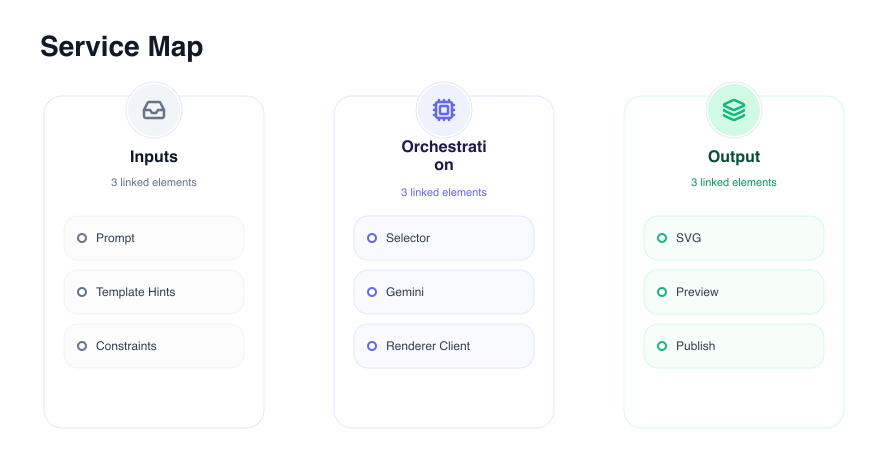
Create flowcharts, sequence diagrams, architecture overviews, mind maps, and timelines. The API can select a published design or generate a creative diagram, then return SVG output and offer PNG downloads.

---

## Visual Request-to-Diagram Output

Send a prompt brief to `POST /rest/v1/generations` and receive publication-ready vector diagrams:

<div className="my-6 overflow-hidden rounded-xl border border-[var(--nb-border)] bg-[var(--nb-card)] p-4 shadow-sm">
  <div className="mb-3 flex items-center gap-2 text-xs font-mono text-[var(--nb-muted-foreground)]">
    <span className="rounded bg-[var(--nb-accent)] px-2 py-0.5 font-semibold text-[var(--nb-foreground)]">POST /rest/v1/generations</span>
    <span>Example diagram preview</span>
  </div>
  <div className="flex justify-center rounded-lg bg-[var(--nb-muted)] p-4 border border-[var(--nb-border-strong)]">
    <img 
      src="/examples/three-columns.png" 
      alt="Example three-column diagram" 
      className="max-h-72 object-contain rounded" 
    />
  </div>
</div>

---

## Core Capabilities

- **Smart Design Selection** — Choose `design: "auto"` to let the model select the best published design or render creative custom vector JSX.
- **Restrained Aesthetic System** — Built-in light/dark appearance modes, curated palette roles, and font families (`Inter` (`inter`), `Source Sans 3` (`source-sans-3`), `Archivo` (`archivo`), and `Barlow Condensed` (`barlow-condensed`)).
- **Free Instant Re-rendering** — Change colors, fonts, or light/dark appearances on any generated diagram for free without consuming credits.
- **Vector SVG & Crisp PNG** — Export standalone SVG files or crisp, browser-rendered PNG rasters up to 3x scale.

---

## Quick Example Request

Send a request to `POST /rest/v1/generations` to create a diagram:

```bash
  curl -X POST https://svgdiagram.ai/rest/v1/generations \
  -H "Authorization: Bearer svg_sk_your_api_key" \
  -H "Content-Type: application/json" \
  -d '{
    "prompt": "Three-column overview of product features",
    "design": "auto",
    "appearance": "light",
    "fontId": "inter"
  }'
```

### Example Response Payload

```json
{
  "status": "ok",
  "item": {
    "id": "<generation-id>",
    "svg": "<svg xmlns=\"http://www.w3.org/2000/svg\">...</svg>"
  }
}
```

---

## Documentation Sections

Explore the documentation guides below to integrate diagram generation into your application:

- [Quickstart](/quickstart) — Generate your first diagram.
- [Authentication](/authentication) — Public catalog access vs Bearer token protected routes.
- [Diagram Generation](/generation) — Prompts, design modes (`auto`, `creative`, named designs), and refinement.
- [Styling & Re-render](/styling) — Themes, palettes, font selection, and free re-rendering.
- [Exports & Formats](/exports) — Downloading vector SVG and high-resolution PNG rasters.
- [Errors & Credit Model](/errors) — Error status codes, JSON payload shapes, and refund behavior.
- [API Reference](/api) — Complete OpenAPI specification endpoint browser.

Source: https://docs.svgdiagram.ai/index.mdx
